
Tax
Classes, rates, how a rate is chosen, compound tax, shipping, and what the report counts.
Settings, Tax. Tax is worked out from two things: what the product is, and where the shopper is.
Classes Say What a Thing Is
A tax class is a category of goods, not a percentage: standard, reduced, zero rated, exempt. Every product belongs to one, and a shop selling one kind of thing needs only the default.
Put a product in the wrong class and it is taxed wrongly in every jurisdiction at once, so this is worth getting right once rather than fixing rate by rate.
Rates Say What That Costs Where
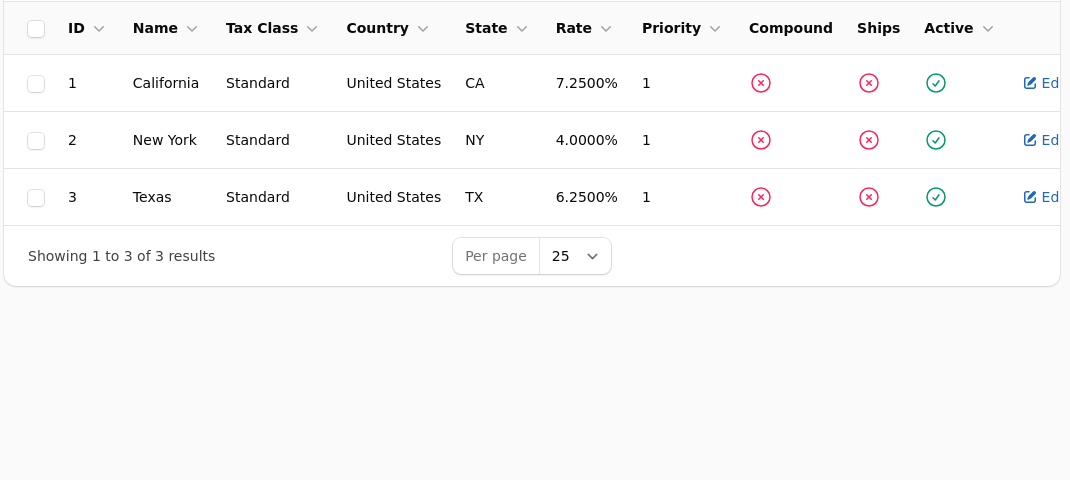
A rate joins a class to a place and carries the percentage. A place can be a country, and optionally a state, a city, or a postcode pattern.
How a Rate Is Chosen
The most specific match wins. A rate for California beats a rate for the United States, and a rate for a postcode beats both. Where two rates are equally specific, the one with the lower priority number is used.
This is why an unexpected tax figure is nearly always a second rate you forgot about, matching more specifically than the one you were looking at.
Compound Rates
A compound rate is charged on the total including tax already added, rather than on the goods alone. It is correct in a few jurisdictions and wrong in most. Leave it off unless you know yours requires it.
Tax on Shipping
Each rate decides for itself whether the delivery charge is taxable, because the answer genuinely differs by jurisdiction. It is a tick on the rate, not a setting for the whole shop.
Customers Who Do Not Pay Tax
A customer group can be marked tax exempt, which is how resellers and institutions are handled. A variant can also be exempt on its own, which is how an ebook sits beside printed editions in a jurisdiction that treats them differently.
Automatic Calculation
If your rates are complicated enough to be a job in themselves, connect Avalara under Integrations and it calculates at checkout instead. You stop maintaining the rate table and start paying per lookup. It is worth it at the point where keeping rates current is taking real time, and not before.
What the Report Counts
The tax report counts tax on orders where the money was actually taken. Cancelled, refunded, failed and unpaid orders are not in it.
Why the report will not match your order list
An unpaid cheque order shows no tax until it is marked paid, and joins the figures then, dated to when the order was placed. That is the behaviour you want at the end of a quarter. It does mean the report will never match a raw count of orders, and both numbers are right.
Prices with Tax Included, or Added at Checkout
Which of the two you use is a decision about your market rather than a technical one. Shops selling to businesses usually show prices without tax and add it. Shops selling to the public in jurisdictions where the shelf price must be the price paid show it included.
Whichever you choose, be consistent across the shop and say so near the price. A shopper who reaches checkout and finds the total higher than the prices suggested is a shopper who abandons the basket.
Where the Tax Is Worked Out From
The delivery address, not the billing one, in most jurisdictions. That is what the shop uses.
It means the tax line can change after the shopper enters their address, which is normal and is why the total at checkout can differ from the total in the basket.
Rounding
Tax is calculated per line and then totalled. A long order can therefore differ by a penny from the same sum worked out on the total, and that is expected rather than an error.
What the Report Counts
The tax report counts tax on orders where the money was actually taken. Cancelled, refunded, failed and unpaid orders are not in it.
Why the report will not match your order list
An unpaid cheque order shows no tax until it is marked paid, and joins the figures then, dated to when the order was placed. That is the behaviour you want at the end of a quarter. It does mean the report will never match a raw count of orders, and both numbers are right.
A refund reduces the tax figure for the period the original order falls in, not the period the refund happened in. That is correct for filing and surprising if you are comparing a month to a bank statement.
A Quarterly Routine That Works
Open the Tax Report for the quarter. Export it. Check the total against the Sales Summary for the same months, where the tax column should agree. If it does not, the difference is nearly always an order marked paid after you last looked, which is exactly why you check rather than assume.
Before You Rely on Any of This
Place a test order to each place you trade in and check the tax line. Rates are easy to configure plausibly and wrongly, and the only way to see what a customer is actually charged is to be one.
Tax is also the one area where being wrong is expensive and nobody tells you for a year. If your position is at all complicated, have somebody who does this for a living look at your rate table once, early.