
Taking Payments
Every method, what connecting one involves, how offline orders behave, and what a failure records.
Settings, Payment. Nothing can be bought until at least one method is switched on.
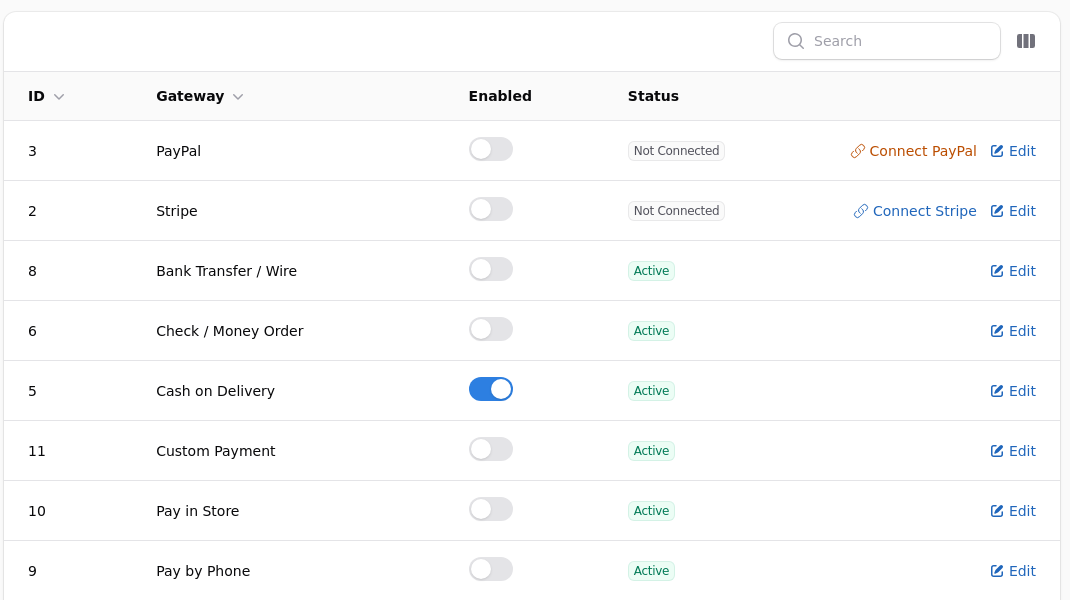
Not every processor is available to every shop
Which ones you can use depends on your plan, on the country your business is registered in, and on the processor's own decision about your account. A processor can be visible here and still decline you, and one that accepts you can later restrict particular methods. See What Your Plan Includes.
Each method has a toggle and a status. A card processor shows Not Connected until you link an account, and cannot be enabled before then. Offline methods are active as soon as you switch them on, because there is nothing to connect to.
Card Processors
Stripe is the quickest start. Connect the account and you can take cards the same day. Money reaches your bank on Stripe's schedule, not the shop's, so your shop's revenue figure and your bank balance will never agree on a given day.
PayPal adds PayPal itself and, through it, the wallets: Pay Later, Venmo, Apple Pay and Google Pay. Some shoppers will only ever pay this way, which is the argument for having it alongside cards rather than instead of them.
Authorize.net suits a shop that already has a merchant account and wants to keep it. It also offers eCheck, which is a bank debit rather than a card.
Square and Braintree are there for shops already using them elsewhere.
You can run several at once. The shopper chooses at checkout, and the order records which one was used.
Offline Methods
Cheque, money order, bank transfer, cash on delivery, pay in store, pay by phone and purchase order all behave the same way: the order is placed, nothing is charged, and it sits unpaid until somebody marks it paid.
An unpaid order is invisible to your figures
It does not count towards revenue, does not appear in your sales reports, and does not appear in your tax report, until somebody marks it paid. That is deliberate, and it is why an order can be shipped and still unpaid, which is normal for trade customers on terms.
Each offline method carries its own instructions, shown to the shopper at checkout and repeated in their confirmation email. That is where the cheque payee, the bank details or the terms go. A method with no instructions leaves the customer guessing.
Marking One Paid
Open the order and use Mark paid, or set the payment status directly. The money joins your reports from that moment, dated to when the order was placed rather than when you marked it, so a cheque that arrives late still lands in the right month.
When a Payment Fails
A failed payment leaves the order in place with its payment status set to failed, and records the reason the processor gave. That is usually more useful than the shopper's description: declined, insufficient funds, address mismatch, or a card type you do not accept.
Failed orders never count towards revenue.
A run of identical failures is a setting, not bad luck
A card type you have not enabled declines every single time. If the same reason appears repeatedly, check the processor's configuration before concluding that customers are being careless.
Refunds
Refund from the order inside the shop. The shop tells the processor, records it against the order, and adjusts your reports.
Refunding at the processor's own dashboard does none of that. The shop goes on believing it has the money, the order still reads as paid, and every report stays wrong until somebody notices.
A partial refund is supported and leaves the order as partly refunded, which still counts towards revenue for the part you kept.
What the Shopper Sees at Checkout
The methods you have enabled, in the order you set. A card form appears in the page itself rather than sending them elsewhere, and PayPal opens its own window.
Each offline method shows its instructions at the point of choosing, and repeats them in the confirmation email. That text is doing real work: it is where the cheque payee, the bank details, the terms and the "we will invoice you" sentence belong.
Fewer methods, chosen deliberately, convert better
A checkout offering eight ways to pay makes the shopper stop and think. Enable what you actually want used, and keep the rest off until somebody asks.
Wallets
Apple Pay, Google Pay and Venmo arrive through PayPal rather than as separate methods. They appear for shoppers whose device and browser support them, which is why you may not see them on your own machine while customers do.
Saved Cards and Repeat Payment
A shop taking subscriptions stores a token with the processor rather than a card number. Nobody at your shop, or on the platform, ever sees the card.
That also means a customer whose card expires needs to supply a new one before the next cycle, and a subscription that fails is usually an expired card rather than a refusal.
Reading a Failure
Open the order. The payment status is failed and the reason the processor gave is recorded against it.
| Reason | Usually means |
|---|---|
| Declined | The bank refused, and will not say why |
| Insufficient funds | Exactly that |
| Address mismatch | Billing address does not match the card |
| Card type not accepted | A setting at your end |
| Expired card | The customer needs a new one |
A run of identical failures is a setting, not bad luck
A card type you have not enabled declines every single time. If the same reason appears repeatedly, check the processor's configuration before concluding customers are being careless. This has cost real shops real sales for weeks.
Reconciling with Your Bank
Your shop's revenue and your bank balance will never agree on a given day, and should not.
Processors settle on their own schedule, net of their fees, often batching several days together. The shop records what the customer paid, in full, on the day they paid it.
Reconcile on the processor's own payout report against your bank, and use the shop's Sales Summary for what you sold. Trying to make the two agree day by day is a way to lose an afternoon.
Test Before You Open
Buy something from your own shop with a real card and refund it. That is the only way to see the whole path: the checkout, the confirmation email, the order as it appears to you, and the refund.
Then do it again with each offline method you have enabled, to check the instructions read sensibly to somebody who has not seen them before.