
Point of Sale
Selling in person: opening a session, taking payment, the cash drawer, and how it reconciles against your online sales.
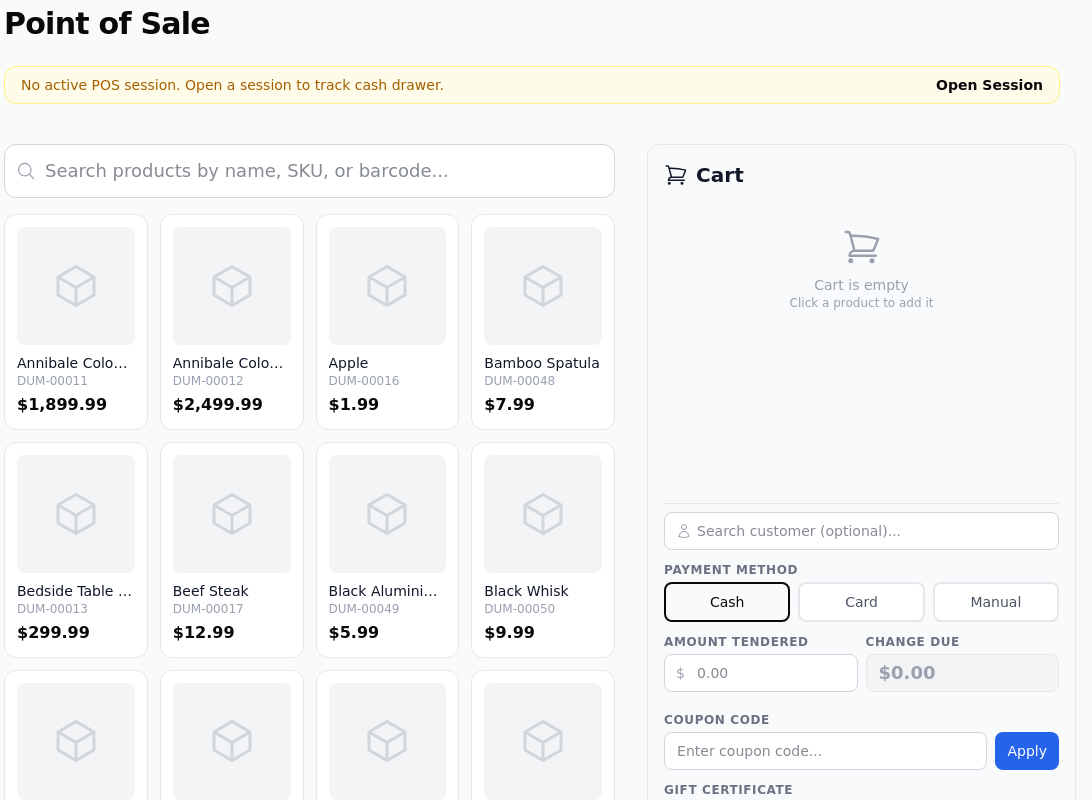
Sales, Point of Sale. A till screen for selling face to face, at a counter, a stall or an event. It uses the same catalogue, the same stock and the same customers as your shop, so a sale here behaves like any other order.
Open a Session First
The yellow bar at the top says whether a session is open. Open Session starts one and asks for your opening balance, which is the cash you are putting in the drawer to start with.
Without a session the drawer is not tracked
You can sell without opening one, and the sales are recorded perfectly well. What you lose is the cash reconciliation at the end: the shop has no opening figure to compare against, so it cannot tell you whether the drawer balances.
A session belongs to the person who opened it, so two people on two tills each have their own, and each reconciles separately.
Finding Products
The search box matches name, SKU or barcode. With a barcode scanner, scanning is the same as typing the number and pressing enter, so no special setup is needed: the scanner behaves as a keyboard.
Products also appear as tiles, which is faster for the handful of things you sell constantly. Click one to add it.
The Cart
Quantities can be changed, lines removed, and the whole cart cleared. It behaves like a shopper's basket, including stock checks: a product that has run out will not go in unless it allows backorders.
Search customer attaches the sale to an existing customer. That is optional, and worth doing when they are a member or on trade terms, because their group pricing applies the moment they are attached. Leave it blank and the sale is anonymous.
Discounts and Codes
Coupon code applies the same codes your online shop uses, with the same rules about what they are restricted to.
Gift certificate redeems a certificate against the sale, deducting from its balance.
A staff discount can be applied where you have one configured, which is the usual way of handling a trade or employee price without creating a customer account for it.
Taking Payment
Three methods along the bottom.
Cash. Enter the amount tendered and the screen shows the change due. This is what the drawer figure is built from.
Card. Takes payment through your connected processor. If you use a card terminal, the payment is captured on the terminal and recorded against the sale.
Manual. Records that payment was taken some other way: an existing invoice, a bank transfer, a staff account. It marks the sale as paid without moving money, so use it deliberately.
What Happens to Stock
Stock comes down exactly as it does online, from the same figures. That is the point of using it rather than a separate till: you do not end up with two counts of the same shelf.
If you sell in person and online from the same stock, this also means a sale at the counter can take the last one and the website will stop offering it within seconds.
Closing the Session
Close Session asks for the closing balance, the cash actually in the drawer, and compares it against what the shop expected.
The session records the opening balance, cash sales, card sales, manual sales, the expected cash and what you counted. A difference is written down rather than hidden, which is what makes it useful: a drawer that is consistently a few pounds short is telling you something.
Add a note when there is an explanation, such as a float taken out or a refund paid in cash.
How It Shows Up in Reports
A point of sale order is an order. It appears in your order list, counts towards revenue on the day it was taken, and is included in the sales, products and tax reports with everything else.
If you want to look at counter sales separately, tag them or filter by the payment method used.
Before an Event
Three things worth doing the day before.
Check the products you intend to sell are active and have stock, because the till will refuse anything that is out.
Check your tax rates cover where you are selling, since tax at a stall follows the same rules as tax online.
And decide whether you are attaching customers. Doing it properly at an event is slow, and doing it inconsistently makes the resulting data worth less than not doing it at all.