
Adding a Product
Every tab on the product form, what each field does, and the four that cause trouble later.
Catalog, Products, New product. The form is split into tabs. Most products need the first three and nothing else.

Which tabs you see depends on the product's type, set on the General tab. Options and Variants appears only for a variable or subscription product. Subscription appears only for a subscription. Digital appears only for a downloadable one.
General

Name is what the shopper sees and what the search box matches on. Write it the way somebody would say it, not the way it reads on an invoice.
Slug is the web address. It fills itself in from the name. Shorten it if it is unwieldy, then leave it alone: changing a slug after publishing breaks every link anybody has saved, shared or printed.
Short description is the line that appears on listing tiles and in search results. One sentence.
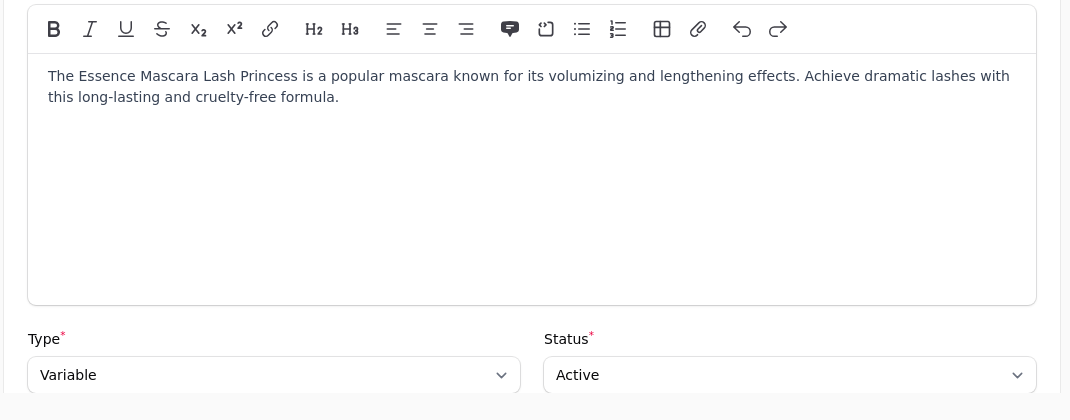
Description is the full text on the product page. The toolbar covers the usual formatting. Turn on Edit description as HTML if you need to paste embed code, such as a preview widget, because the visual editor strips those.
Type decides the shape of everything else.
| Type | Use it for |
|---|---|
| Simple | One thing at one price |
| Variable | One thing sold in several editions, each with its own stock |
| Digital | A download, with no shipping |
| Subscription | Something billed on a cycle |
Status is draft or active. A draft is invisible to everyone but you, which is how you build a product over several sittings without a half-finished page being live.
Pricing
Price is what it sells for. Compare price renders as a struck-through original with a discount badge, so only fill it in if the thing genuinely used to cost that. Cost price is what you paid, and is used for margin reporting. It is never shown to a shopper.
Show lowest variant price displays "From $9.99" on listings instead of the base price. It only applies to a product with variants.
Default variant pre-selects an edition on the product page and makes its price the headline.
An unpriced default is worse than no default
If the variant you pick as the default has no price, the shop has nothing to advertise. Pick one that is priced, or leave this blank and let the cheapest speak for the listing.
Name your price lets the shopper enter their own amount, for donations and pay-what-you-want. Minimum amount sets a floor. A name-your-price product is deliberately excluded from group discounts, because a percentage off an amount somebody chose themselves is meaningless.
Group prices set a specific price for a specific customer group. A price set here beats any blanket percentage that group gets, and the two never stack: the customer gets the single best price they are entitled to.
SKU is your own code for the thing, unique across the shop, and the code your warehouse and your accounts match on. For books it is the ISBN. Barcode is the scannable one, which is often the same number.
Inventory
Track inventory on means the shop counts down and stops selling at zero. Off means it sells forever, which is right for a download and wrong for nearly everything else.
Stock quantity is how many you have. If you hold stock in more than one place, set it per location on the Inventory by Location panel instead and the shop adds them up.
Writing a location figure replaces the overall one
Saving any per-location quantity recalculates the product's total as the sum of its locations. That is correct, and it will quietly overwrite a number you typed into the overall field a moment earlier.
Allow backorders lets it keep selling past zero. Low stock threshold is the number at or below which it appears in the low stock alerts.
Damaged copies and damaged price offer second-hand or shelf-worn copies of the same title on the same listing, sold from your damaged stock rather than your good stock. Leave the price blank and it prices itself at your configured discount off list.
Shipping
Weight and dimensions are what carriers quote from.
One missing weight distorts quotes for other things
A product with no weight is treated as weightless. Because a quote is calculated for the whole basket, a single wrong weight produces a wrong price for every basket that product lands in, including baskets full of correctly weighed items. When a shipping price looks absurd, the cause is rarely the product being looked at.
Requires shipping off marks it as something nothing gets posted for, which keeps it out of shipping quotes and stops the shop asking for a delivery address when the basket holds nothing else.
Tax
Tax class says what kind of thing this is, not what it costs. The rates attached to that class decide the percentage, by destination. Put a product in the wrong class and it is taxed wrongly everywhere at once.
Visibility
Controls who can see it, and when. A product can be restricted to one or more customer groups, which is how trade-only lines work: invisible to everyone else, including in search.
Scheduled visibility publishes or retires it on a date without anybody being at a desk.
Media
The first image is the one used on listing tiles, in the basket and on the order. Order them so the strongest is first.
SEO
Title and description for search engines, and a canonical address if this product also lives elsewhere. Leave them blank and the shop uses the product's own name and short description, which is usually fine.
Product Details
A list of label and value pairs shown on the product page: Author, ISBN, Format, Published, Material. Display only, and the right place for the facts that do not belong in a description.
Custom Input Fields
Choices the shopper makes that are not editions: a gift message, a personalisation, or a required choice that changes the price. See Options and variants for when to use one of these instead of a variant.
Before You Call It Done
Open the product on the shop itself. The price, the picture, the options and the delivery estimate appear together there in the way a shopper meets them, and that is where a mistake becomes obvious.